Guide
Largo AI Terminal: Your AI Desk Analyst
How to use Largo AI as your desk analyst: chat interface, tool traces, live data queries, and the questions that get the best structured answers.
Largo AI is not a chatbot. It is a desk analyst wired directly into BlackOut's live data layer — GEX structure, options flow, dealer positioning, the Night Hawk edition, the 0DTE Command board, and dozens more sources. When you ask a question, Largo does not guess. It calls the same tools the dashboards render and composes a grounded answer from real numbers.
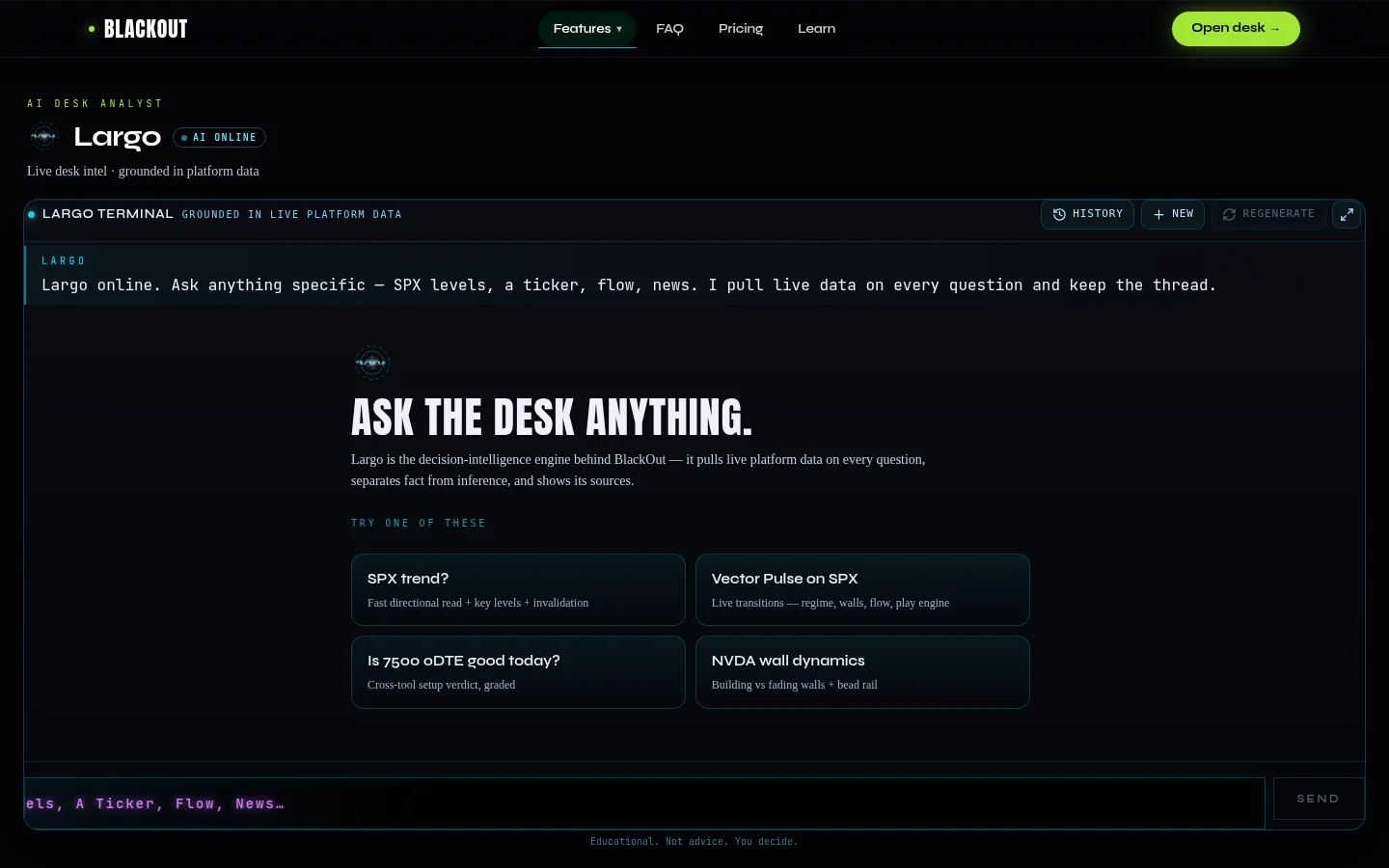
The chat interface
Largo lives at `/terminal` — a single full-page chat surface. The layout is simple:
- Message log — the scrolling conversation between you and Largo. Your questions appear as user bubbles; Largo's answers render as markdown with tables, levels, and structured analysis.
- Starter prompts — when the session is empty, four example questions appear above the input row. These are not decorative — they demonstrate good query shape. Click one to send it immediately.
- Follow-up chips — after each answer, up to three contextual next questions appear below the response. These are generated from the answer's content and point toward the natural next investigation.
- Input row — type your question and send. Sessions persist in browser sessionStorage, so a multi-step investigation survives a page refresh within the same browser session.
LargoThinkingState: watching the pipeline work
While Largo is processing your question, idle UI is replaced by a thinking state: rotating status phrases that show what the system is doing, a progress indicator, and active tool labels naming the specific data sources being queried. If you see "get_gex" and "get_options_flow" in the labels, Largo is pulling the live dealer map and flow tape for your ticker right now.
Tool trace chips: verify every number
Under each Largo answer, tool trace chips list every data source that was actually fetched for that response. This is the most important element on the page. If you ask "Is SPX pinned right now?" and the chips show `get_gex` and `get_spx_structure`, you know the answer is grounded in the live GEX matrix and the current SPX Slayer desk state. If no tools ran, the output is general commentary only — treat it accordingly.
Always read the tool chips before trusting a number in the prose.
Key tools Largo accesses
Largo has access to a deep surface of live data tools. The ones you will see most often:
- get_quote — live price, change%, day range, VWAP, volume from Polygon. The baseline for any ticker question.
- get_technicals — multi-timeframe chart analysis: daily, hourly, and 15-minute EMAs, RSI, MACD, ATR, support/resistance levels, and weekly/monthly breakout highs and lows.
- get_spx_structure — the full live SPX Slayer desk: price, GEX, flow tape, dark pool levels, news headlines, macro context, and tide. The same data the dashboard shows.
- get_spx_play — SPX Slayer's own play-engine snapshot: phase, action, direction, score, thesis, confluence factors, gate state, the AI arbiter verdict, and the currently open play if any.
- get_options_flow — per-ticker flow analysis. For SPX/SPXW this returns the desk's own flow slice. For every other ticker it merges three live Unusual Whales pulls with BlackOut's own HELIX ingested tape, deduped and enriched with strike stacks.
- get_gex — the dealer gamma map: GEX by strike, gamma flip, call wall, put wall. For SPX, all levels are SPX-denomination.
- get_nighthawk_edition — the full Night Hawk Evening Edition: all plays with rank, conviction, thesis, entry/target/stop, score, flow streak, and IV rank. Can pull a specific past date.
- get_zerodte_plays — the 0DTE Command scanner board: today's committed plays with lifecycle status, fresh finds, and excluded tickers.
Beyond these core tools, Largo accesses earnings, news (Benzinga channels), dark pool data, IV statistics, sector flow, market movers, economic calendar, short interest, institutional ownership, and more — over 130 tools in total.
Questions that get the best answers
Largo performs best with specific, data-grounded questions. Good patterns:
- "What's the gamma regime for SPY right now?" — triggers get_gex, returns the flip level, walls, and regime posture.
- "Walk me through the current SPX structure." — triggers get_spx_structure, returns the full desk read including GEX, flow, dark pool, and macro context.
- "Is there unusual flow in NVDA today?" — triggers get_options_flow, returns the merged flow tape, strike stacks, and aggression metrics.
- "What does the Cortex evidence say about this ticker?" — triggers the platform snapshot with Cortex context, returns the evidence vector assessment.
- "Show me tonight's Night Hawk plays with their theses." — triggers get_nighthawk_edition, returns the full ranked edition.
- "What options greeks matter most for this setup?" — triggers get_greeks, returns strike-level greeks with context.
Poor patterns: "What should I trade?" (too vague — no tool can answer this), "Will AAPL go up?" (Largo does not predict), "Give me a play" (that is the Evening Edition's job, not Largo's).
Verification and honesty
Every Largo answer runs through a claim verification layer that checks whether numeric claims in the prose trace to numbers the tools actually returned. When coverage is low — many numbers in the text but few traced to source data — Largo surfaces a verification caveat in the response. This is not a disclaimer; it is a factual statement about grounding.
For a high-level overview, see the Largo AI guide. For tips on pre-market prep, intraday queries, and post-session review, see Getting Better Answers from Largo AI. Use Largo as a faster, more thorough way to interrogate the desk — not as a replacement for reading the dashboards yourself. The best workflow is to ask Largo a focused question, verify the tool chips match your intent, then cross-check the key levels on the live Thermal or Vector displays. Get access →
BlackOut provides educational tools and market analysis only and does not provide investment advice. Options and equities trading involve substantial risk and are not suitable for every investor.
Related guides
Night Hawk Evening Edition: Prep for the Next Session
How to read the Night Hawk Evening Edition: ranked session prep, conviction tiers, track record, market context, and morning confirmation workflow.
0DTE Command: The Always-On Intraday Scanner
How the 0DTE Command scanner works: session heat states, hard entry gates, confluence system, thesis health, and the always-on multi-ticker intraday engine.
What Is Dealer Gamma Exposure? A Trader's Guide to Reading the Market Like the Desks Do
Dealer gamma exposure explains why the market pins, accelerates, or reverses at key levels. Learn how to read it — and trade before the crowd moves.
SPX Slayer Dashboard: A Complete Walkthrough
Walk through every panel and value on the SPX Slayer dashboard — the three-column layout, hero price, GEX regime, VWAP tint, and freshness indicators.
Ready to trade with live dealer gamma?
See plans and open the desk — SPX Slayer from $49/mo.
View pricing →