Guide
HELIX Flow Scanner: Complete Walkthrough
A complete walkthrough of the HELIX flow scanner — columns, premium filters, type toggles, analytics panel, replay mode, and the ticker drill-down drawer.
HELIX is BlackOut's institutional options flow scanner. It filters the raw firehose of options trades into the prints that actually carry signal — unusual activity, aggressive sweeps, and anomalies that stand out from routine hedging noise. Here is how to read every element on the screen.
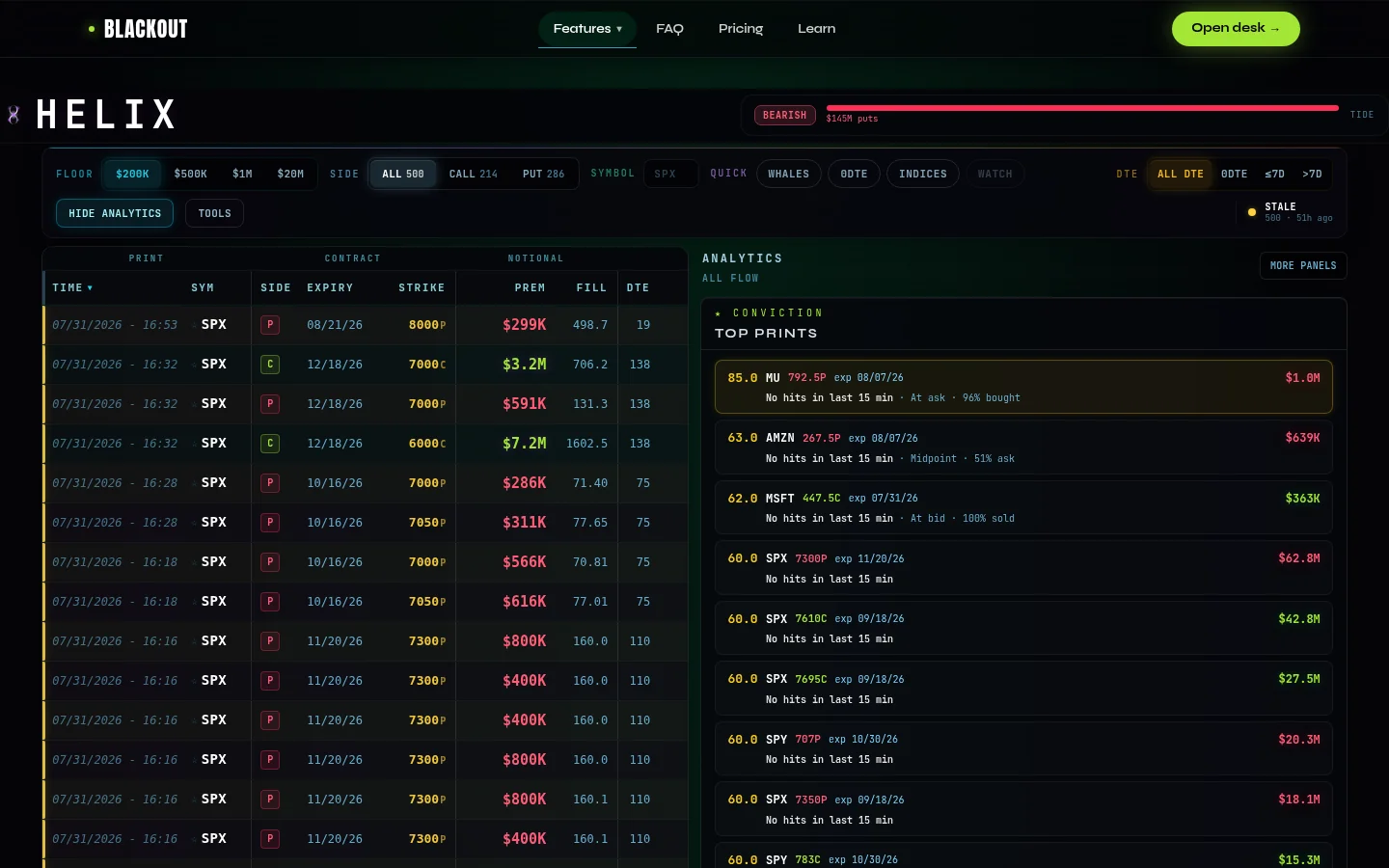
HelixFlowTable: the core feed
The main panel is a real-time table of options trades that pass HELIX's premium and signal filters. Each row is a single print or aggregated burst. The columns:
- Time — when the trade hit the tape (ET).
- Ticker — the underlying symbol.
- CALL / PUT — contract type, color-coded (green/red).
- Expiry / Strike / DTE — expiration date, strike price, and days to expiry. 0DTE contracts carry a badge.
- Premium — dollar value of the trade.
- Fill — fill price of the contract.
- Ask% — conviction metric: total_ask_side_premium / total_premium x 100. 60%+ = buyer paid at the ask (conviction). 40%- = seller hit the bid. See HELIX Flow Signals Explained.
- OI — open interest. When volume exceeds OI, new positions are being created.
- IV — implied volatility at fill time.
- OTM% — how far out of the money the strike is. Deeper OTM at large premium = more unusual.
- Rule — execution type: SWEEP (multi-exchange, signals urgency), BLOCK (large single-venue), or FLOOR (physical floor). See HELIX Flow Signals.
- Score — internal signal score combining premium, aggression, OI ratio, and rule type.
- Signals — contextual badges: GEX proximity (gamma flip, walls), dark pool correlation, anomaly markers.
Premium floor filters
A row of chips at the top sets the minimum premium threshold for trades to appear in the table:
- $200K — broadest view, mid-size institutional prints.
- $500K — larger trades only (recommended starting point).
- $1M — major institutional activity.
- $20M+ — whale-tier prints; rare but significant.
Type filter and counts
Toggle between ALL, CALL, or PUT to filter the table by contract type. Each toggle shows a live count of how many qualifying trades are in each bucket for the current session — a quick read on whether the day's flow leans bullish (call-heavy) or bearish (put-heavy) at a glance.
Ticker filter and watchlist
A search bar lets you filter the table to a single ticker. For names you watch regularly, star them to add to your watchlist — starred tickers float to the top of the filter and can be toggled on as a group. A CSV export button downloads the current filtered table for offline analysis or journaling.
Replay mode
HELIX supports replay mode for historical review. Select a past date and the table loads that session's flow chronologically. Pick a day the market moved hard, replay the flow, and see which prints led the move. Also useful for post-session debriefs.
Analytics column
To the right of the flow table, an analytics panel provides aggregated views:
- Net Premium leaderboard — the tickers with the largest net call-minus-put (or put-minus-call) premium on the session. This surfaces the names where directional conviction is most concentrated, regardless of how many individual prints there are.
- Strike Stacks — shows where premium is stacking at specific strikes on a given ticker. A heavy stack at one strike suggests a consensus price target among institutional flow.
- Dark Pool panel — aggregated dark pool prints for the session, showing where off-exchange block trades are concentrating. Cross-reference with the flow table to see whether dark pool stock activity precedes or follows the options prints. For a deeper walkthrough, see Reading Dark Pool Data on HELIX.
- Velocity Radar — tracks the rate of flow, not just the total. A spike in velocity (many qualifying prints in a short window) is an urgency signal independent of premium size.
Ticker drill-down
Clicking a ticker opens a slide-out panel showing all qualifying prints for that name, aggregated premium by direction, strike distribution, and a mini Thermal exposure profile. The drawer takes you from "interesting print" to "full picture on this name."
Practical workflow
Set the premium floor at $500K, scan for names with high Ask% and SWEEP rules. Click into the ticker detail view for the full picture. Cross-check the signals column for gamma proximity and dark pool correlation. For interpreting the Tide bar, anomaly banners, and AI brief, see HELIX Flow Signals Explained. For separating signal from noise, see How to Read Options Flow. For the underlying tape-reading techniques, see Options Volume Analysis. For this same flow read pulled onto a specific earnings print, see Meridian: The Earnings Desk. Get access →
BlackOut provides educational tools and market analysis only and does not provide investment advice. Options trading involves substantial risk and is not suitable for every investor.
Related guides
HELIX Flow Signals: Tide, Sweeps & Anomalies
HELIX flow signals explained — the Tide bar, flow anomaly banners, AI brief, ask-percent conviction, sweep vs block vs floor rules, and GEX proximity pills.
What Is Dark Pool Trading? How It Affects Options Flow
Dark pools are private exchanges where institutions trade off the public tape. Learn how to spot dark pool prints and what they mean for options flow.
Reading Dark Pool Data on HELIX
How to read dark pool data on HELIX — the dark pool panel, Thermal overlay rail, spotting institutional accumulation, and cross-referencing with gamma levels.
Options Volume Analysis: Reading the Tape
Learn to read options volume: at-the-ask vs at-the-bid, sweep orders, block trades, and how HELIX automates tape reading for directional signals.
Ready to trade with live dealer gamma?
See plans and open the desk — SPX Slayer from $49/mo.
View pricing →